

Playground guide
Try prompts, languages, and settings in the Addis AI Playground before you write code.
Before writing code, we recommend testing your prompts interactively.
Test your parameters
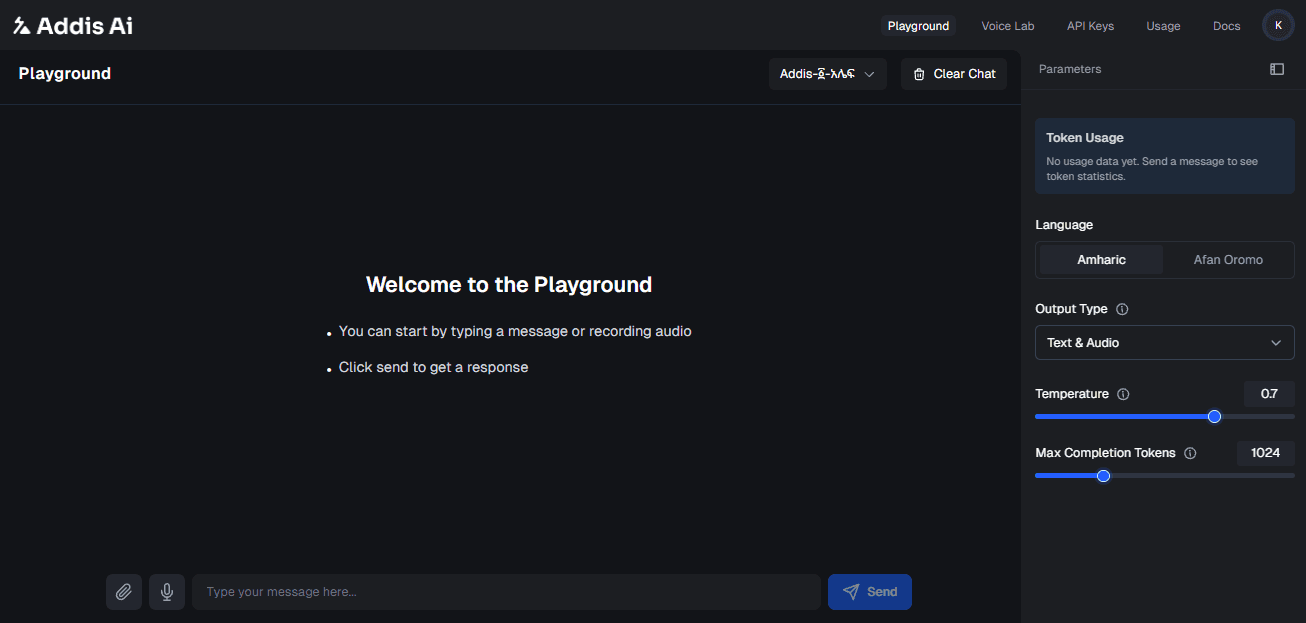
- Select a model: Choose
Addis-፩-አሌፍfor text generation. - Choose the language and output type: Select Amharic or Afaan Oromo and the response format you want to test.
- Adjust temperature:
- Set to 0.2 for factual answers (History, Math).
- Set to 0.7 for creative writing (Stories, Poems).
- Set the response length and check usage: Adjust the maximum completion tokens, send a text or audio prompt, and review the token count.
The Voice Lab experience is available from the Voice Lab navigation item when you want to discover and preview Addis Voices 2 separately from the Playground.
Once you are happy with the result, you are ready to integrate.
Next steps
When a prompt works the way you want, follow the Quick Start to make the same request from code.
Edit on GitHub
Last updated on