

Quick Start
From Playground to Production in less than 5 minutes.
This guide will take you through the complete lifecycle: testing your ideas visually, securing an API key, and writing your first line of code.
Prototype in Playground
Before writing code, we recommend testing your prompts interactively.
Test your Parameters
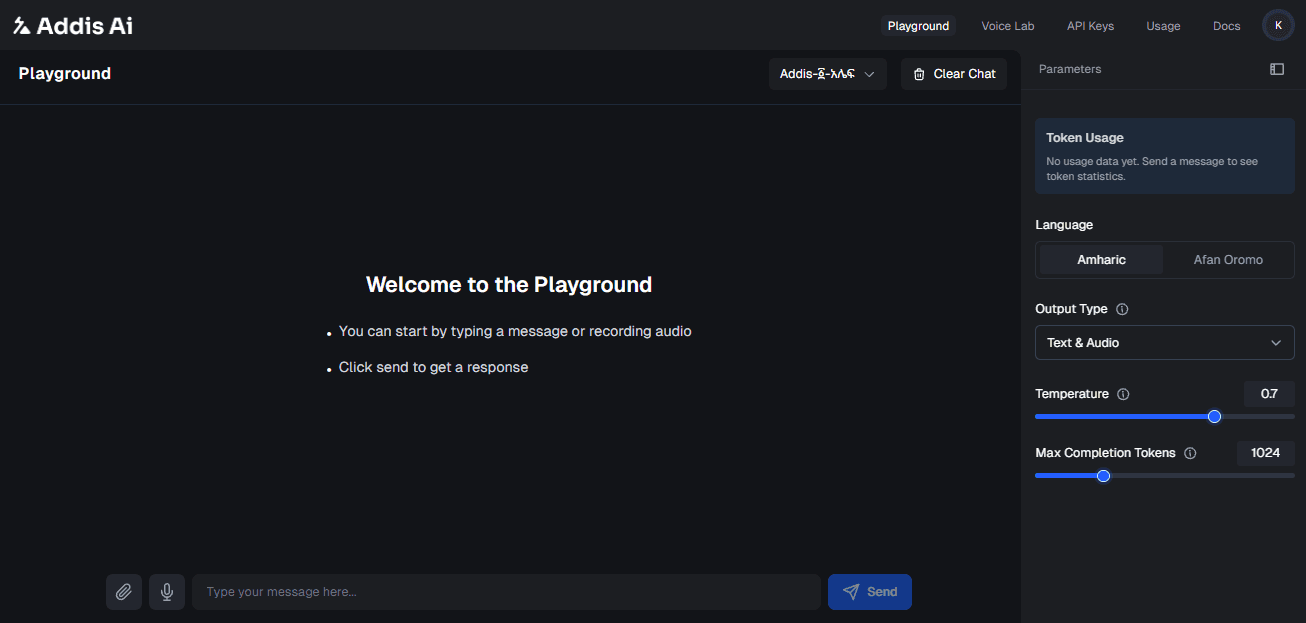
- Select a model: Choose
Addis-፩-አሌፍfor text generation. - Choose the language and output type: Select Amharic or Afaan Oromo and the response format you want to test.
- Adjust temperature:
- Set to 0.2 for factual answers (History, Math).
- Set to 0.7 for creative writing (Stories, Poems).
- Set the response length and check usage: Adjust the maximum completion tokens, send a text or audio prompt, and review the token count.
The Voice Lab experience is available from the Voice Lab navigation item when you want to discover and preview Addis Voices 2 separately from the Playground.
Once you are happy with the result, you are ready to integrate.
Get your API Key
Authentication is handled via a secret x-api-key header.
Generate New Key
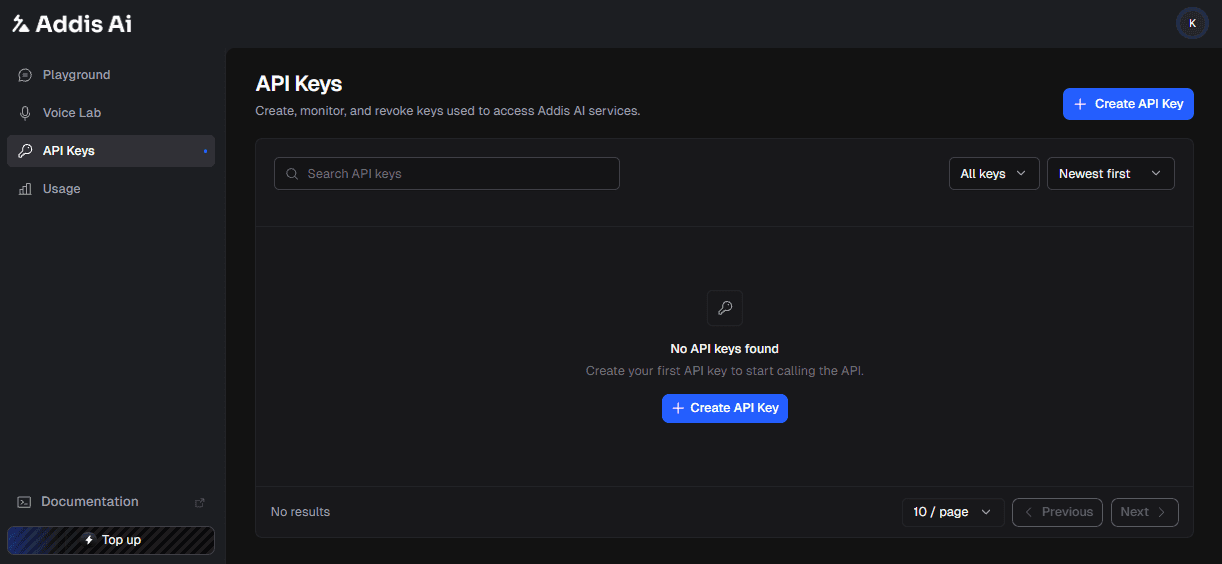
- Navigate to the API Keys Dashboard.
- Click Create API Key.
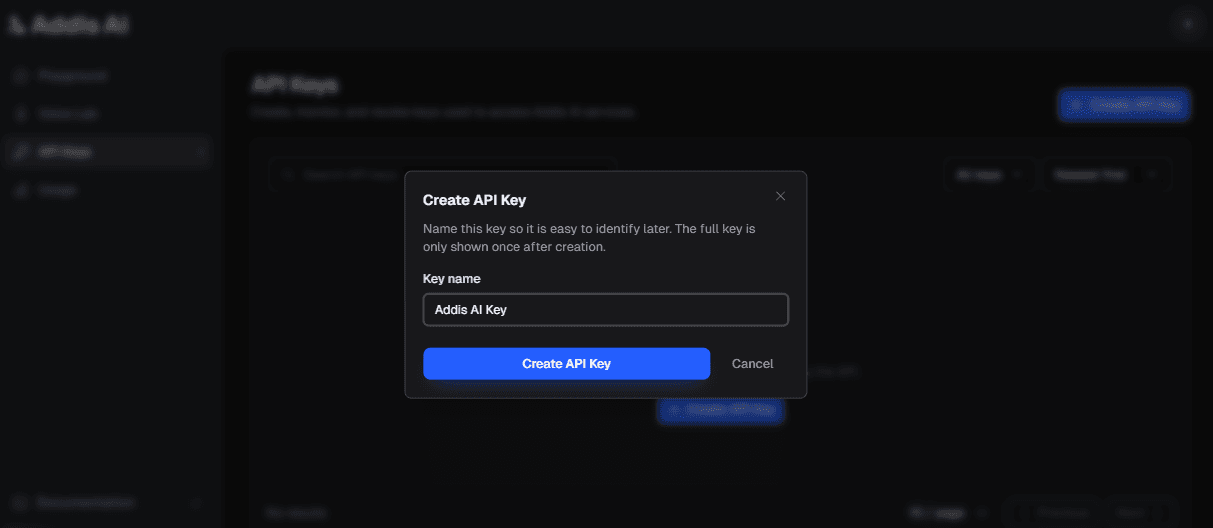
- Name your key (e.g.,
Addis AI App) in the popup window.
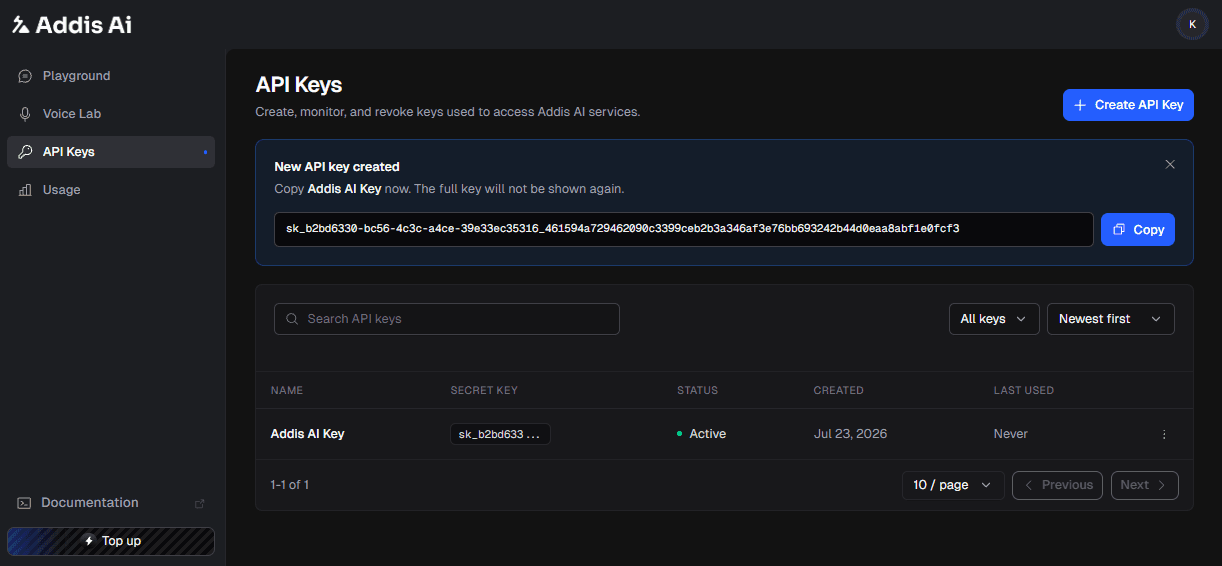
Copy Secret
Important
You will see a key starting with sk_.... Copy this now.
You will not be able to see it again after closing the window.
Configure Endpoints
REST API requests use the following production base URL:
https://api.addisassistant.comRealtime voice uses a separate WebSocket endpoint:
wss://relay.addisassistant.com/wsFor Addis Voices 2 text-to-speech streaming, use wss://api.addisassistant.com/api/v1/realtime/voice with a scoped session ticket. Follow the Streaming text-to-speech guide for session creation and SDK release availability.
Install the official SDK and store your key in ADDIS_API_KEY.
npm install addisai
export ADDIS_API_KEY="your_api_key"
pip install addisai
export ADDIS_API_KEY="your_api_key"Available Capabilities
| Capability | Endpoint | Method |
|---|---|---|
| Chat and Text Generation | /api/v1/chat_generate | POST |
| Text-to-Speech (Addis Voices 2) | /api/v1/voice/generations | POST |
| Speech-to-Text | /api/v2/stt | POST |
| Translation | /api/v1/translate | POST |
| Multimodal | /api/v1/chat_generate | POST multipart/form-data |
| Realtime Voice | wss://relay.addisassistant.com/ws | WebSocket |
Quick Example
Choose a capability below to make your first request.
Endpoint: /api/v1/chat_generate
Simple JSON request for chatbots and text analysis.
import AddisAI from "addisai";

const addis = new AddisAI();
const response = await addis.chat.completions.create({
  messages: [{
    role: "user",
    content: "ሰላም፣ ኢትዮጵያ ውስጥ ስንት ክልሎች አሉ?",
  }],
});

console.log(response.choices[0].message.content);
from addisai import AddisAI
addis = AddisAI()
response = addis.chat.completions.create(
messages=[{
"role": "user",
"content": "ሰላም፣ ኢትዮጵያ ውስጥ ስንት ክልሎች አሉ?",
}],
)
print(response["choices"][0]["message"]["content"])curl https://api.addisassistant.com/api/v1/chat_generate \
-H "Content-Type: application/json" \
-H "x-api-key: $ADDIS_API_KEY" \
-d '{
"prompt": "ሰላም፣ ኢትዮጵያ ውስጥ ስንት ክልሎች አሉ?",
"target_language": "am"
}'Endpoint: /api/v2/stt
Requires multipart/form-data. Note that metadata must be passed as a JSON string inside request_data.
import AddisAI, { fileFromPath } from "addisai";

const addis = new AddisAI();
const result = await addis.speech.transcribe({
  audio: await fileFromPath("audio.wav"),
  language: "am",
});

console.log(result.text);
from addisai import AddisAI
addis = AddisAI()
with open("audio.wav", "rb") as audio:
result = addis.speech.transcribe(audio=audio, language="am")
print(result["text"])curl --location 'https://api.addisassistant.com/api/v2/stt' \
--header 'x-api-key: $ADDIS_API_KEY' \
--form 'audio=@"audio.wav"' \
--form 'request_data="{ \"language_code\": \"am\" }"'Endpoint: /api/v1/translate
Translate text between any of the supported languages (am, om, en).
import AddisAI from "addisai";

const addis = new AddisAI();
const result = await addis.translate.create({
  text: "ገበሬው ማሳውን ዘወትር ይጎበኛል",
  from: "am",
  to: "om",
});

console.log(result.text);
from addisai import AddisAI
addis = AddisAI()
result = addis.translate.create(
text="ገበሬው ማሳውን ዘወትር ይጎበኛል",
source="am",
target="om",
)
print(result["text"])curl --location 'https://api.addisassistant.com/api/v1/translate' \
--header 'Content-Type: application/json' \
--header 'x-api-key: $ADDIS_API_KEY' \
--data '{
"text": "ገበሬው ማሳውን ዘወትር ይጎበኛል",
"source_language": "am",
"target_language": "om"
}'Endpoint: /api/v1/chat_generate
Upload an image and ask questions about it. Ideal for explaining diagrams, identifying objects, or analyzing screenshots.
import AddisAI, { fileFromPath } from "addisai";

const addis = new AddisAI();
const response = await addis.chat.completions.create({
  messages: [{ role: "user", content: "Describe this image in Amharic." }],
  attachments: [{ file: await fileFromPath("market.jpg", "image/jpeg") }],
});

console.log(response.choices[0].message.content);
from addisai import AddisAI
addis = AddisAI()
with open("market.jpg", "rb") as image:
response = addis.chat.completions.create(
messages=[{"role": "user", "content": "Describe this image in Amharic."}],
attachments=[image],
)
print(response["choices"][0]["message"]["content"])curl https://api.addisassistant.com/api/v1/chat_generate \
-H "x-api-key: $ADDIS_API_KEY" \
-F 'attachment_0=@market.jpg;type=image/jpeg' \
-F 'request_data={"prompt":"Describe this image in Amharic.","target_language":"am","attachment_field_names":["attachment_0"]}'The Response
The API structure depends on the endpoint.
The SDK exposes this result through response.choices and response.usage. The JSON below is the native REST response.
{
  "response_text": "በአሁኑ ጊዜ በኢትዮጵያ ውስጥ 12 ክልሎች አሉ።...",
  "finish_reason": "stop",
  "usage_metadata": {
    "prompt_token_count": 8,
    "candidates_token_count": 25,
    "total_token_count": 33
  },
  "modelVersion": "Addis-፩-አሌፍ"
}
The SDK returns text, confidence, and usage. The JSON below is the native REST response.
{
    "status": "success",
    "data": {
        "transcription": "ሊያሳውቁ ይችላሉ ነገር ግን የበለጠ እየታወቁ በመጡ ቁጥር ደግሞ ይበልጥ ይነሳሉ የተረጋገጠ ልብና ነበር ያለው ሰው የሃሳብ የድርጊት ዝም",
        "usage_metadata": {
            "totalBilledDuration": "15s",
            "requestId": "69b60667-0000-2a1e-b6d3-d4f547fe6724"
        }
    },
    "confidence": 0.98276204
}
Generate your first Addis Voices 2 clip
Use am-hamen for the first Amharic example. For production, query the voice catalog and preview a voice before saving its ID.
const clip = await addis.voice.generate({
  text: "ሰላም፣ እንኳን ደህና መጡ።",
  voiceId: "am-hamen",
  language: "am",
  outputFormat: "mp3_44100",
  clientRequestId: crypto.randomUUID(),
});

await clip.toFile("welcome.mp3");
clip = addis.voice.generate(
text="ሰላም፣ እንኳን ደህና መጡ።",
voice_id="am-hamen",
language="am",
output_format="mp3_44100",
client_request_id="quickstart-voice-001",
)
clip.to_file("welcome.mp3")curl https://api.addisassistant.com/api/v1/voice/generations \
-H "x-api-key: $ADDIS_API_KEY" \
-H "content-type: application/json" \
-d '{
"text":"ሰላም፣ እንኳን ደህና መጡ።",
"voice_id":"am-hamen",
"language":"am",
"output_format":"mp3_44100",
"client_request_id":"quickstart-voice-001"
}'